Mobile App Design & Development for Geo-Tagged Crop Lifecycle Management
Industry
Agriculture and Agri-Tech
Platform
Mobile Application (Android & iOS)
Services by Perignon
Mobile App Design & Development | UI/UX Design | Cross-Platform App Development
About
AgroTrace
AgroTrace is an agri-tech platform that enhances crop lifecycle visibility and farm traceability through geo-tagged mobile experiences, enabling farmers and field teams to manage farms, crops, inspections, and insights directly from the field.
To support on-ground agricultural operations, AgroTrace required a modern, easy-to-use mobile application that could handle real-world conditions such as rural connectivity, outdoor usage, and non-technical users.
Perigeon was engaged to design and develop the AgroTrace mobile application, ensuring a seamless, scalable, and farmer-friendly experience.
Design & Development Challenges
Designing for Non-Technical Users
Most end users are farmers and field staff with limited exposure to complex digital tools. The app needed to be intuitive, visual, and easy to navigate.
Rural & Field Usage Conditions
The app had to work reliably in outdoor environments with varying network conditions, requiring clear offline states and simple interactions.
Complex Agricultural Workflows
Managing farms, crops, locations, weather data, and insights within a single app required careful information architecture and UX clarity.
Geo-Tagged Accuracy
Farm locations and crop data needed to be accurately captured and displayed using maps and location-based inputs without confusing users.
Perigeon’s Mobile App Solution
Perigeon designed and developed a cross-platform AgroTrace mobile application that simplifies on-field agricultural operations through an intuitive, mobile-first experience. The app is built to support real-world farming conditions, enabling users to capture and manage data efficiently while working directly on-site.
With a strong focus on clarity, speed, and usability, the application helps farmers and field teams complete critical tasks quickly, reduce errors, and ensure accurate, geo-verified data collection across farms and crop lifecycles.
Cross-Platform Mobile Experience
Geo-Tagged Data Accuracy
User-Friendly Field Design
User Authentication & Onboarding
The mobile app features a clean and streamlined authentication flow, including login, sign-up, OTP verification, and password recovery. These flows are designed to minimize friction and help users access the platform quickly, even in low-connectivity environments. Clear visual cues and simple inputs ensure a smooth first-time experience for farmers and field teams.
Farm & Crop Management
AgroTrace allows users to easily add and manage farms by selecting crops, defining soil types, and tracking different stages of the crop lifecycle. Structured input screens reduce errors and make data entry simple for non-technical users. This approach ensures consistent and accurate farm-level data across all agricultural activities.
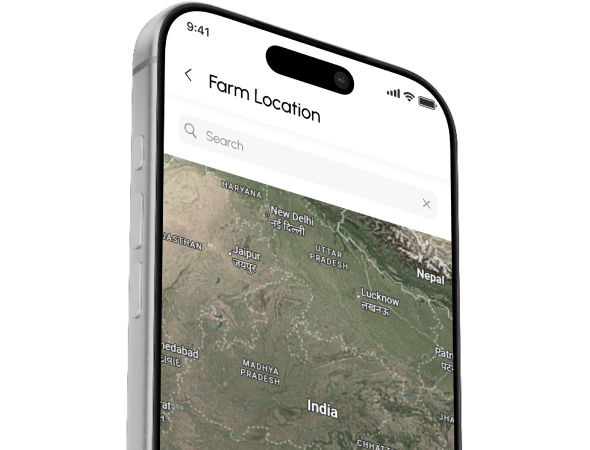
Geo-Tagged Farm Location
Interactive map-based screens enable users to capture and verify farm locations with precise geo-coordinates. Location data is visually presented in a clear and intuitive way, building confidence in data accuracy. This feature plays a key role in improving traceability and transparency across field operations.
Weather & Insights Dashboard
The app provides a dedicated dashboard that displays visual weather forecasts and crop-specific insights relevant to each farm. Information is presented in an easy-to-understand format, helping users make timely and informed decisions. This reduces dependency on external tools and keeps critical insights accessible within the app.
Notifications
The AgroTrace mobile app provides real-time notifications to keep users informed about important activities and updates as they occur. The notification experience is designed to be simple and non-intrusive, ensuring messages are easy to understand without disrupting daily tasks. This helps field teams stay connected, informed, and efficient while working on the ground.
Profile & Settings Management
The profile and settings section allows users to manage personal details, language preferences, notification controls, and account settings with ease. A simple and accessible layout ensures users can customize their experience without confusion. This flexibility improves overall usability and long-term app adoption.
UI/UX Design Highlights
The AgroTrace mobile app is designed with a strong focus on usability, clarity, and real-world farming conditions. Every screen is optimized for quick understanding and effortless interaction, helping farmers and field teams use the app confidently in outdoor and on-site environments.
Farmer-Friendly
Mobile Experience
Designed with a mobile-first approach, the interface is simple, intuitive, and easy to navigate for non-technical users. The layout prioritizes essential actions, reducing learning time and improving on-field efficiency.
Optimized for Outdoor &
Field Usability
Large touch targets, clean typography, and high-contrast color combinations ensure excellent readability under sunlight and varied lighting conditions. This allows users to interact with the app comfortably while working in the field.
Consistent & Clear
Visual Language
Clear visual indicators for status, progress, and insights help users quickly understand information at a glance. A consistent design system across all screens creates a seamless and reliable user experience throughout the app.
Business & User Impact
0%+
Faster Onboarding
Simplified user flows and intuitive navigation helped new users understand and start using the app quickly with minimal guidance.
0%
Reduction in Task Completion Time
Structured farm and crop data entry screens enabled faster updates and reduced effort during on-field operations.
High Data Accuracy with 100% Geo-Tagged Inputs
Location-based data capture improved reliability and trust in field-level information.
Scalable Mobile Experience
A modular design system ensures the app is ready for future crop types, features, and user growth without redesign.
Agile Development Process
Perigeon followed an Agile, sprint-based development approach to deliver the AgroTrace mobile app efficiently while maintaining design quality and flexibility throughout the project lifecycle.
Collaboration
UI/UX design and development were executed in parallel for faster progress.
Planning
Sprint planning was aligned with feature priorities and project milestones.
Feedback
Regular demos enabled continuous feedback and quick refinements.
Iteration
User insights were used to iteratively improve flows and interactions.
QA Process
To deliver a stable and production-ready mobile application, Perigeon followed a structured QA approach focused on usability, consistency, and real-world field performance across devices and usage conditions.
Functionality
Every module was tested end-to-end to ensure accurate navigation, booth actions, chat flows, and webinar operations.
Consistency
UI elements and layouts were validated to maintain a uniform experience across all screens.
Compatibility
The app was tested across multiple devices and screen sizes for reliable performance.
Performance
Responsiveness and app behavior were checked to ensure smooth usage in field conditions.
Frequently asked questions
What was Perigeon’s role in AgroTrace?
Perigeon designed and developed a custom procurement and purchase module for AgroTrace. The work included ERP customization, UI/UX design, purchase order automation, and multi-vendor integration.
Which platforms does the app support?
The AgroTrace Purchase module is available on both web and mobile platforms. The mobile app is built using Flutter for seamless cross-platform support.
Is the app suitable for rural users?
Yes, the app is built for field teams working in rural and low-connectivity areas. It offers an intuitive interface and supports offline operations with automatic sync.
Does the app support geo-tagged data?
Yes, the app records geo-tagged and timestamped data to ensure traceability and compliance. This is especially useful for audits, exports, and quality certification.
Can the app scale for future features?
Yes, the solution uses a modular and scalable architecture. This allows AgroTrace to easily add new features, users, and integrations as the business grows.
Build Smarter, Safer Travel Experiences
Looking to create a data-driven platform that prioritizes user safety and real-time intelligence? Partner with Perigeon to design, build, and scale intelligent digital solutions tailored to your business goals.
Turn your Salesforce ideas into real business results
Planning a Salesforce project or exploring ways to improve your existing setup? Let’s connect. Our experts will understand your business goals, evaluate your requirements, and guide you toward the right Salesforce solution—no obligation, just clear direction.
Whether you’re starting fresh or optimizing what you already have, Perigeon is here to help you move forward with confidence.
mediumslateblue-fox-279168.hostingersite.com uses cookies. We collect statistics and geo graphic data to optimise the site functionality, and deliver the content tailored to your interest. By using our site you agree to our Cookie Policy.